
live like it’s.

1634 字
8 分钟
项目开发随笔 v1.0
Github仓库https://github.com/Frees-Ling/Pipeline-inspection一键安装Vscode Ubuntu
sudo snap install code --classic安装完Vscode之后一定一定要检查是否有自动保存,特别是针对项目级别工程文件,要不然你只能是对空文件编译
配置Git及密钥
#配置Git用户信息git config --global user.name "xxx"git config --global user,email "xx@xx.com"#配置密钥ssh-keygen -t rsa -b 4096 -C "xx@xx.com" #这里会生成密钥cat ~/.ssh/id_rsa.pub #这里会输出密钥内容,把这个复制粘贴到代码平台的SSH配置里配置密钥是为了更好的连接和传输代码(SSH)
#全部搞完之后,进行检查ssh -T git@github.com #后缀不唯一,这里以GitHub为例Ubuntu20.04.x LTS 配置C/C++环境
本教程仅供配置C/C++所用,主要用到的工具均为目前常用工具,需要完整的Ubuntu系统(不可以是试用版本)
#主要安装clanggdbg++gcc#打开终端sudo apt updatesudo apt install build-essential
#验证gcc --versiong++ --version
#如果有版本号出现即为成功,可以进行下一步sudo apt install gdb
#验证gdb --version#验证结果同上
sudo apt install clangsudo apt install cmake#这里如果出现无法安装,是因为软件源错误,解决方法如下sudo cp /etc/apt/sources.list /etc/apt/sources.list.bak #备份#换源deb http://archive.ubuntu.com/ubuntu focal main restricted universe multiversedeb http://archive.ubuntu.com/ubuntu focal-updates main restricted universe multiversedeb http://archive.ubuntu.com/ubuntu focal-security main restricted universe multiverse#随后执行如下命令sudo apt updatesudo apt install clang
#验证clang --versioncmake --version
#备用方案(可选)sudo apt install build-essential clang gdb cmake ninja-buildROS系统安装
注意:
本次管道巡检所使用的ROS只能装在Ubuntu20.x上,Ubuntu22.x以上只能安装ROS2
#更新系统sudo apt updatesudo apt upgrade
#安装工具链sudo apt install curl gnupg lsb-release
#下载ROS公钥sudo mkdir -p /usr/share/keyringscurl -sSL https://raw.githubusercontent.com/ros/rosdistro/master/ros.asc \ | sudo gpg --dearmor -o /usr/share/keyrings/ros-archive-keyring.gpg
#添加ROS1 Noetic源echo "deb [arch=$(dpkg --print-architecture) signed-by=/usr/share/keyrings/ros-archive-keyring.gpg] \http://packages.ros.org/ros/ubuntu $(lsb_release -sc) main" \| sudo tee /etc/apt/sources.list.d/ros-latest.list > /dev/null
#更新软件列表sudo apt update
#进行安装sudo apt install ros-noetic-desktop-full #完整版sudo apt install ros-noetic-ros-base #核心版,仅有ROS
#配置环境变量echo "source /opt/ros/noetic/setup.bash" >> ~/.bashrcsource ~/.bashrc
#安装依赖sudo apt install python3-rosdepsudo rosdep initrosdep update
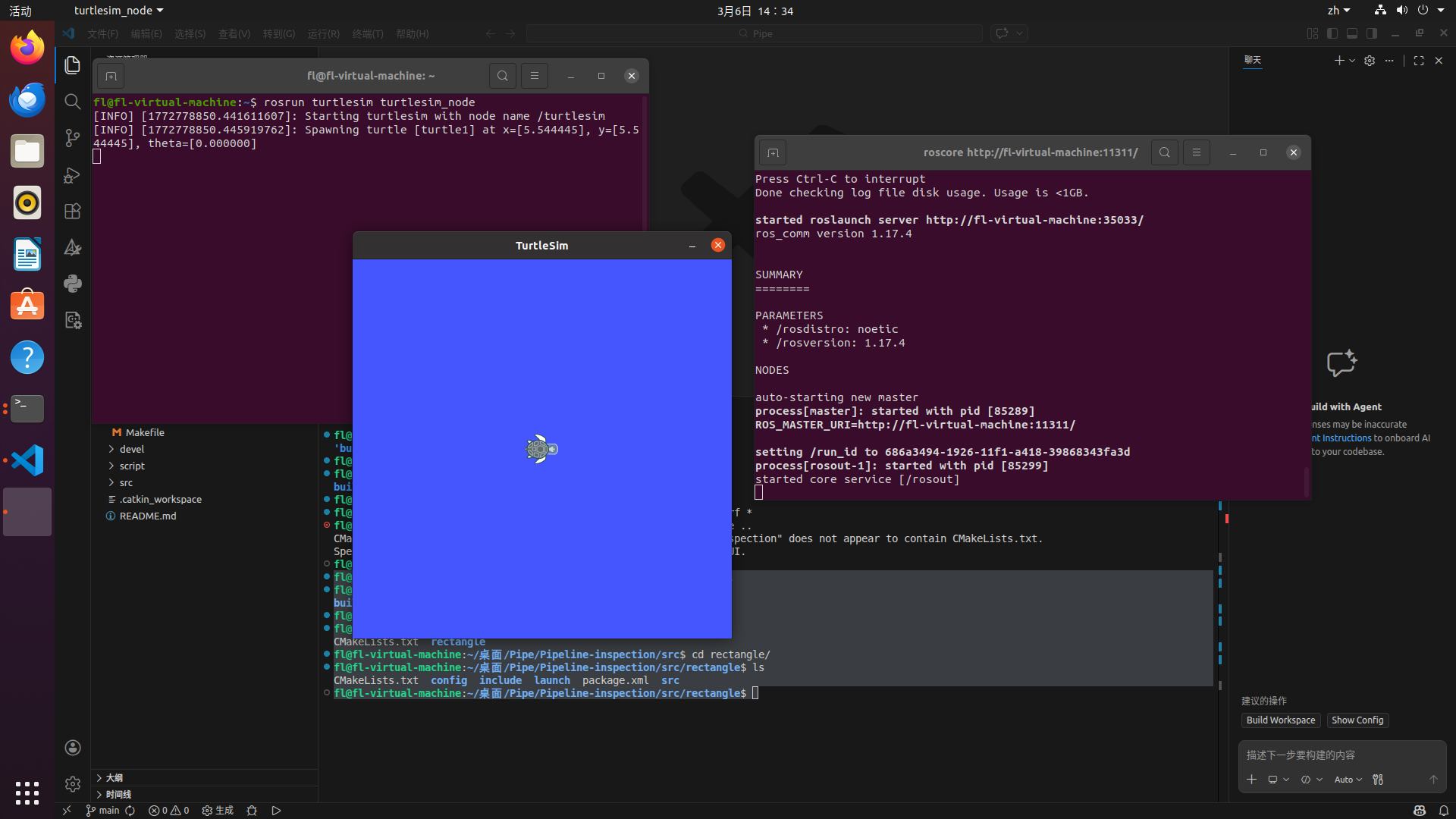
#分别开端口测试是否成功roscorerosrun turtlesim turtlesim_node如下图即为成功
管道巡检代码复刻(足球无人机)
如果只是简单的进行catkin make是不行的,会报如下错误
fl@fl-virtual-machine:~/桌面/Pipe/Pipeline-inspection$ catkin_makeBase path: /home/fl/桌面/Pipe/Pipeline-inspectionSource space: /home/fl/桌面/Pipe/Pipeline-inspection/srcBuild space: /home/fl/桌面/Pipe/Pipeline-inspection/buildDevel space: /home/fl/桌面/Pipe/Pipeline-inspection/develInstall space: /home/fl/桌面/Pipe/Pipeline-inspection/install######## Running command: "cmake /home/fl/桌面/Pipe/Pipeline-inspection/src -DCATKIN_DEVEL_PREFIX=/home/fl/桌面/Pipe/Pipeline-inspection/devel -DCMAKE_INSTALL_PREFIX=/home/fl/桌面/Pipe/Pipeline-inspection/install -G Unix Makefiles" in "/home/fl/桌面/Pipe/Pipeline-inspection/build"####-- The C compiler identification is GNU 9.4.0-- The CXX compiler identification is GNU 9.4.0-- Check for working C compiler: /usr/bin/cc-- Check for working C compiler: /usr/bin/cc -- works-- Detecting C compiler ABI info-- Detecting C compiler ABI info - done-- Detecting C compile features-- Detecting C compile features - done-- Check for working CXX compiler: /usr/bin/c++-- Check for working CXX compiler: /usr/bin/c++ -- works-- Detecting CXX compiler ABI info-- Detecting CXX compiler ABI info - done-- Detecting CXX compile features-- Detecting CXX compile features - done-- Using CATKIN_DEVEL_PREFIX: /home/fl/桌面/Pipe/Pipeline-inspection/devel-- Using CMAKE_PREFIX_PATH: /opt/ros/noetic-- This workspace overlays: /opt/ros/noetic-- Found PythonInterp: /usr/bin/python3 (found suitable version "3.8.10", minimum required is "3")-- Using PYTHON_EXECUTABLE: /usr/bin/python3-- Using Debian Python package layout-- Found PY_em: /usr/lib/python3/dist-packages/em.py-- Using empy: /usr/lib/python3/dist-packages/em.py-- Using CATKIN_ENABLE_TESTING: ON-- Call enable_testing()-- Using CATKIN_TEST_RESULTS_DIR: /home/fl/桌面/Pipe/Pipeline-inspection/build/test_results-- Forcing gtest/gmock from source, though one was otherwise available.-- Found gtest sources under '/usr/src/googletest': gtests will be built-- Found gmock sources under '/usr/src/googletest': gmock will be built-- Found PythonInterp: /usr/bin/python3 (found version "3.8.10")-- Found Threads: TRUE-- Using Python nosetests: /usr/bin/nosetests3-- catkin 0.8.12-- BUILD_SHARED_LIBS is on-- BUILD_SHARED_LIBS is on-- ~~~~~~~~~~~~~~~~~~~~~~~~~~~~~~~~~~~~~~~~~~~~~~~~~-- ~~ traversing 1 packages in topological order:-- ~~ - rectangle-- ~~~~~~~~~~~~~~~~~~~~~~~~~~~~~~~~~~~~~~~~~~~~~~~~~-- +++ processing catkin package: 'rectangle'-- ==> add_subdirectory(rectangle)-- Could NOT find mavros (missing: mavros_DIR)-- Could not find the required component 'mavros'. The following CMake error indicates that you either need to install the package with the same name or change your environment so that it can be found.CMake Error at /opt/ros/noetic/share/catkin/cmake/catkinConfig.cmake:83 (find_package): Could not find a package configuration file provided by "mavros" with any of the following names:
mavrosConfig.cmake mavros-config.cmake
Add the installation prefix of "mavros" to CMAKE_PREFIX_PATH or set "mavros_DIR" to a directory containing one of the above files. If "mavros" provides a separate development package or SDK, be sure it has been installed.Call Stack (most recent call first): rectangle/CMakeLists.txt:10 (find_package)
-- Configuring incomplete, errors occurred!See also "/home/fl/桌面/Pipe/Pipeline-inspection/build/CMakeFiles/CMakeOutput.log".See also "/home/fl/桌面/Pipe/Pipeline-inspection/build/CMakeFiles/CMakeError.log".Invoking "cmake" failed那么错误报告很明显,缺失mavros这个包,我们需要进行安装
如下是解决方案
# 更新软件源列表sudo apt update
# 修复可能的依赖损坏sudo apt --fix-missing install
# 安装 mavros 核心包sudo apt install ros-noetic-mavros ros-noetic-mavros-extras
# 安装 mavros 的地理数据(用于 GPS 等功能,必须装)wget https://raw.githubusercontent.com/mavlink/mavros/master/mavros/scripts/install_geographiclib_datasets.shchmod +x install_geographiclib_datasets.shsudo ./install_geographiclib_datasets.sh
# 删除临时脚本(可选)rm install_geographiclib_datasets.sh
#如果报如下错误fl@fl-virtual-machine:~/桌面/Pipe/Pipeline-inspection$ wget https://raw.githubusercontent.com/mavlink/mavros/master/mavros/scripts/install_geographiclib_datasets.sh--2026-03-06 14:49:11-- https://raw.githubusercontent.com/mavlink/mavros/master/mavros/scripts/install_geographiclib_datasets.sh正在解析主机 raw.githubusercontent.com (raw.githubusercontent.com)... 185.199.110.133, 185.199.109.133, 185.199.108.133, ...正在连接 raw.githubusercontent.com (raw.githubusercontent.com)|185.199.110.133|:443... 已连接。已发出 HTTP 请求,正在等待回应... 读取文件头错误 (连接被对方重设)。重试中。
--2026-03-06 14:49:31-- (尝试次数: 2) https://raw.githubusercontent.com/mavlink/mavros/master/mavros/scripts/install_geographiclib_datasets.sh正在连接 raw.githubusercontent.com (raw.githubusercontent.com)|185.199.110.133|:443... 已连接。已发出 HTTP 请求,正在等待回应... 读取文件头错误 (连接被对方重设)。重试中。
--2026-03-06 14:49:53-- (尝试次数: 3) https://raw.githubusercontent.com/mavlink/mavros/master/mavros/scripts/install_geographiclib_datasets.sh正在连接 raw.githubusercontent.com (raw.githubusercontent.com)|185.199.110.133|:443...
#那么就是网络问题了
#如果下载失败,可进行如下操作sudo apt install geographiclib-toolssudo geographiclib-get-geoids egm96-15
#验证# 查找 mavros 包的位置rospack find mavros
# 预期输出(类似):# /opt/ros/noetic/share/mavros那么解决了包缺失,我们可以很顺利地进行构建,如下为成功构建
fl@fl-virtual-machine:~/桌面/Pipe/Pipeline-inspection$ catkin_makeBase path: /home/fl/桌面/Pipe/Pipeline-inspectionSource space: /home/fl/桌面/Pipe/Pipeline-inspection/srcBuild space: /home/fl/桌面/Pipe/Pipeline-inspection/buildDevel space: /home/fl/桌面/Pipe/Pipeline-inspection/develInstall space: /home/fl/桌面/Pipe/Pipeline-inspection/install######## Running command: "make cmake_check_build_system" in "/home/fl/桌面/Pipe/Pipeline-inspection/build"############ Running command: "make -j8 -l8" in "/home/fl/桌面/Pipe/Pipeline-inspection/build"####Scanning dependencies of target mytestScanning dependencies of target detectionScanning dependencies of target yaw_printerScanning dependencies of target cross_rectangle[ 11%] Building CXX object rectangle/CMakeFiles/yaw_printer.dir/src/yaw_printer.cpp.o[ 22%] Building CXX object rectangle/CMakeFiles/detection.dir/src/threshold_binary.cpp.o[ 33%] Building CXX object rectangle/CMakeFiles/mytest.dir/src/test2.cpp.o[ 44%] Building CXX object rectangle/CMakeFiles/cross_rectangle.dir/src/cross_rectangle.cpp.o[ 55%] Building CXX object rectangle/CMakeFiles/cross_rectangle.dir/src/PID_controller.cpp.o[100%] Linking CXX executable /home/fl/桌面/Pipe/Pipeline-inspection/devel/lib/rectangle/yaw_printer[100%] Linking CXX executable /home/fl/桌面/Pipe/Pipeline-inspection/devel/lib/rectangle/cross_rectangle[100%] Linking CXX executable /home/fl/桌面/Pipe/Pipeline-inspection/devel/lib/rectangle/mytest[100%] Linking CXX executable /home/fl/桌面/Pipe/Pipeline-inspection/devel/lib/rectangle/detection[100%] Built target yaw_printer[100%] Built target mytest[100%] Built target detection[100%] Built target cross_rectangle第三方库安装
Eigen(线性代数库)
sudo apt updatesudo apt install libeigen3-dev安装完成后,头文件在 /usr/include/eigen3
OpenCV2
sudo apt install libopencv-dev=2.4.9+dfsg-1注意:Ubuntu 20.04 默认可能没有旧版 OpenCV2,需要自己编译,或者干脆用 OpenCV4,API 兼容性大部分没问题
OpenCV2 编译版
sudo apt install build-essential cmake git libgtk2.0-dev pkg-config libavcodec-dev libavformat-dev libswscale-devgit clone https://github.com/opencv/opencv.gitcd opencvgit checkout 2.4mkdir build && cd buildcmake ..make -j$(nproc)sudo make install安装完成后,头文件在 /usr/include/opencv 和 /usr/include/opencv2
国内
Terminal window